Launch a client portal your agency can resell — in 5 days or less.
How to go from approvals buried in email and Slack to a resellable client portal in 5 days or less — just by using a pre-built Softr + Airtable system, without ever hiring developers or rebuilding your stack, and best of all only spending around 2 hours of setup per client.
We’ll email you a short walkthrough using sample data. Prefer live? Book a 20-min walkthrough instead.
Why most agencies still feel “held together by email”
- Requests land in email, Slack, DMs and forms — never in one place.
- Files live across Drive, Dropbox, Loom and local folders.
- Approvals are “yep, looks good” messages buried in long threads.
- When a client questions a change, the team has to dig through inboxes.
- No simple way to show status or an audit trail without building yet another sheet.
Turn one build into recurring revenue
Example: 12 clients at $99/mo = $1,188 MRR from a single portal.
Or 12 clients at $199/mo = $2,388 MRR if your offer supports a higher tier.
You set your own pricing – this kit just gives you the system and rollout playbook.
Clone, brand and ship in under 2 hours
Use the step-by-step deployment SOP to clone our Softr + Airtable stack, update logos and copy, and invite your first client.
Template, terms and a full rollout playbook
Portal templates (Softr + Airtable) plus reseller terms, pricing deck, sample rollout emails and the deployment SOP.
Before vs After — What changes for your agency
Agency OS doesn’t replace your whole stack. It gives you one clean, repeatable way to handle approvals, files and client updates.
Before the portal
- Approvals buried in email threads and Slack DMs
- No clear audit trail when clients question changes
- Files spread across Drive, Dropbox and local folders
- AMs chasing clients for logins, sign-offs and assets
- Hard to productize retainers or upsell add-ons
After the portal
- Clients log into one portal for requests, files and sign-offs
- Every approval tied to a clear audit trail in Airtable
- Role-based access for Client, AM and Admin views
- Branded experience you can resell to every client
- Repeatable system that makes your agency look “enterprise-grade”
How it works — in 3 simple steps
We give you the full system. You decide if you want kit-only, or extra help with the first rollout.
We share the Softr + Airtable templates plus the deployment SOP. You clone into your own workspaces and swap in your branding.
Use the SOP and email scripts to move one existing client onto the portal. Test the approvals, files and audit trail flow.
Use the pricing deck and templates to plug the portal into your core offer, upsell to current clients, and add it into new deals.
Who this is for
• 5–40 person agencies or studios
• 10–50 active clients on retainers or ongoing projects
• Still running approvals and file reviews through email, Slack or Sheets
• Happy to use Softr + Airtable (or willing to try them)
Not for:
• Agencies with fewer than 2 active clients (no pilot possible).
• Teams that insist on staying in Asana / ClickUp-only workflows.
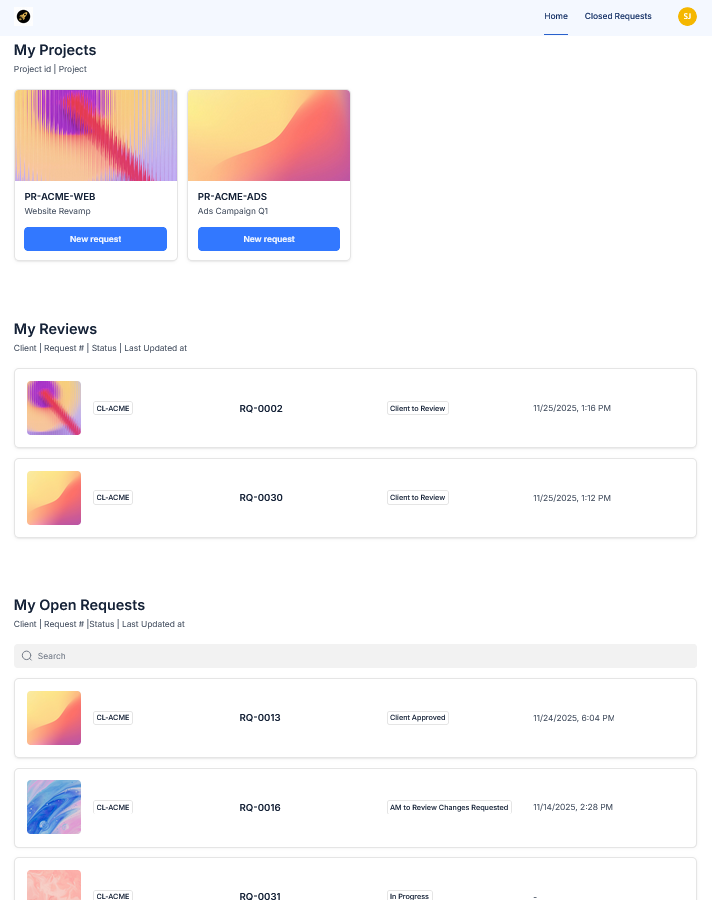
If that sounds like you, the 3-minute demo will show you exactly how the portal works for a client, an account manager and an admin.
What you’ll see in the 3-minute demo
- Client dashboard with “My Reviews” and “My Open Requests”
- The request → file → approval → feedback flow in one place
- How account managers see work across multiple clients
- How clients, AMs and admins can all see the full history once a request is closed
** Capacity note: we only run up to 3 active implementations at any time. New projects join the waitlist once those slots are full.
Request the 3-minute walkthrough
Tell us a bit about your team and we’ll email you the 3-minute demo video along with a short summary of how the portal would fit into your setup.
Book a 20-min walkthrough instead →